Performance Testing
Application Performance Testing
1. Test Preparation (On Local Machine)
- Install k6
# Windows (using chocolatey)
choco install k6

# MacOS
brew install k6

# Linux
sudo gpg --no-default-keyring --keyring /usr/share/keyrings/k6-archive-keyring.gpg --keyserver hkp://keyserver.ubuntu.com:80 --recv-keys C5AD17C747E3415A3642D57D77C6C491D6AC1D69
echo "deb [signed-by=/usr/share/keyrings/k6-archive-keyring.gpg] https://dl.k6.io/deb stable main" | sudo tee /etc/apt/sources.list.d/k6.list
sudo apt-get update
sudo apt-get install k6
- Verify installation
k6 version
2. Create Test Script
- Create
test-performance.js
import http from "k6/http";
import { check, sleep } from "k6";

export const options = {
  stages: [
    { duration: "3m", target: 100 }, // Gradually increase to 100 users in 3 minutes
    { duration: "5m", target: 100 }, // Maintain 100 users for 5 minutes
    { duration: "2m", target: 0 },   // Decrease to 0 in 2 minutes
  ],
  rps: 200,                         // 200 requests/second
  thresholds: {
    http_req_duration: ["p(95)<500"], // 95% requests under 500ms
    http_req_failed: ["rate<0.01"],   // Error rate below 1%
  },
};

export default function () {
  const BASE_URL = "http://<YOUR_ALB_DNS>/"; // Replace with your IP:PORT or ALB DNS

  // Test homepage
  const response = http.get(BASE_URL);

  // Verify response
  check(response, {
    "status is 200": (r) => r.status === 200,
  });

  sleep(1);
}
3. How to Run Test
# Save script to test-performance.js
k6 run test-performance.js
4. Gradual Test Scenarios
- Basic Test (Warm Up)
import http from "k6/http";
import { check } from "k6";

export const options = {
  stages: [
    { duration: '1m', target: 100 },    // Gradual increase
    { duration: '2m', target: 100 },    // Maintain stable
    { duration: '1m', target: 0 }       // End
  ],
  rps: 200
};

export default function () {
  http.get("http://<YOUR_ALB_DNS>/");
}
Purpose: System warm-up, basic testing
- Heavy Test (High Load)
import http from "k6/http";
import { check, sleep } from "k6";

export const options = {
  stages: [
    { duration: '3m', target: 500 },    // Sharp increase
    { duration: '5m', target: 500 },    // Maintain high load
    { duration: '2m', target: 0 }       // End
  ],
  rps: 1000
};

export default function () {
  // Heavy computation
  let result = 0;
  for(let i = 0; i < 100000; i++) {
    result += Math.sqrt(i);
  }

  // Concurrent requests
  const response = http.get(BASE_URL + "/");

  check(responses, {
    "status is 200": (r) => r.status === 200
  });

  sleep(0.1);
}
Test Execution Notes:
- Run scripts sequentially
- Wait for system stabilization between tests (5-10 minutes)
- Monitor and record results at each level
On EC2 Instance
Performance Test Results
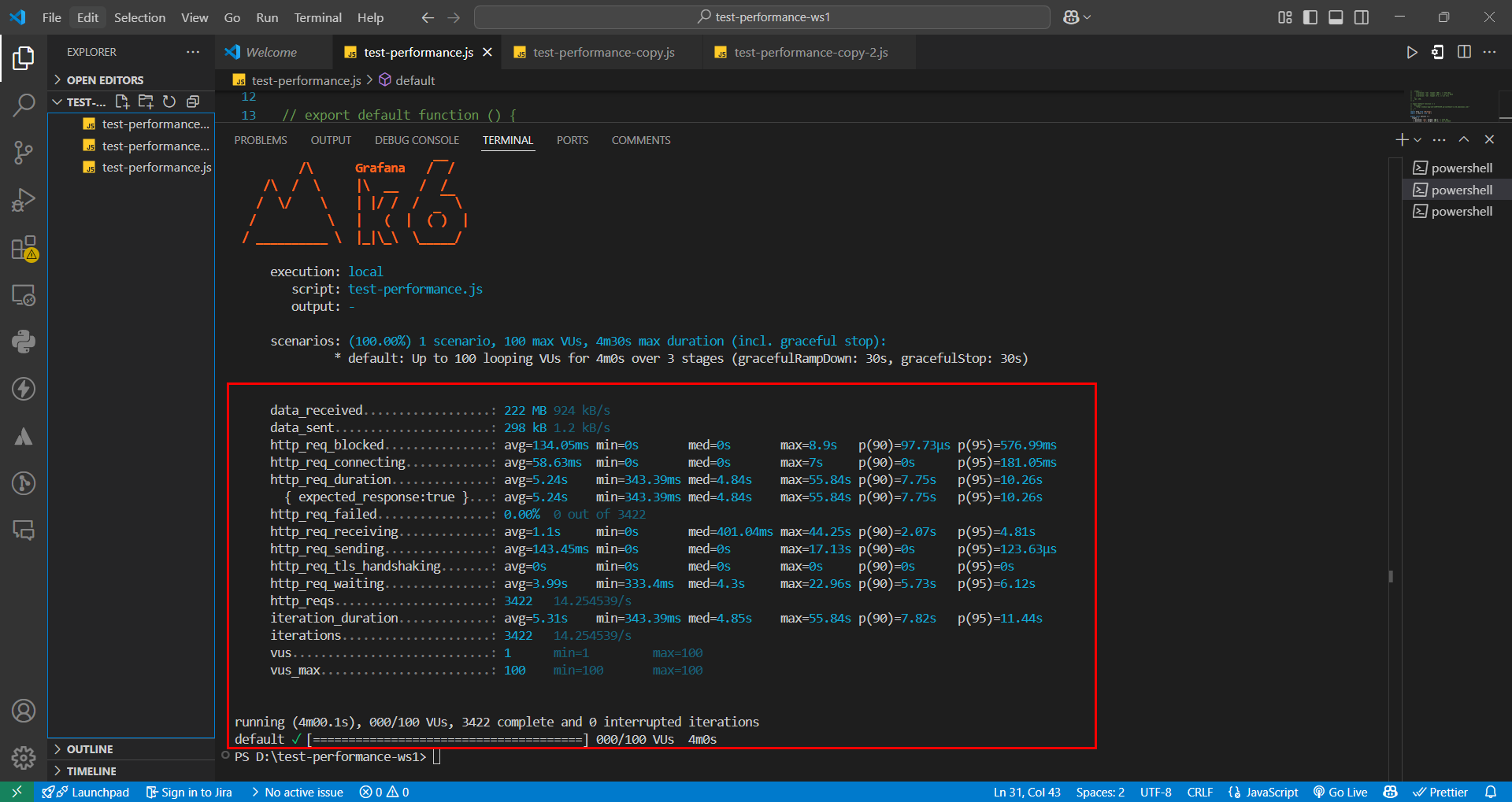
Basic Test (Warm Up)
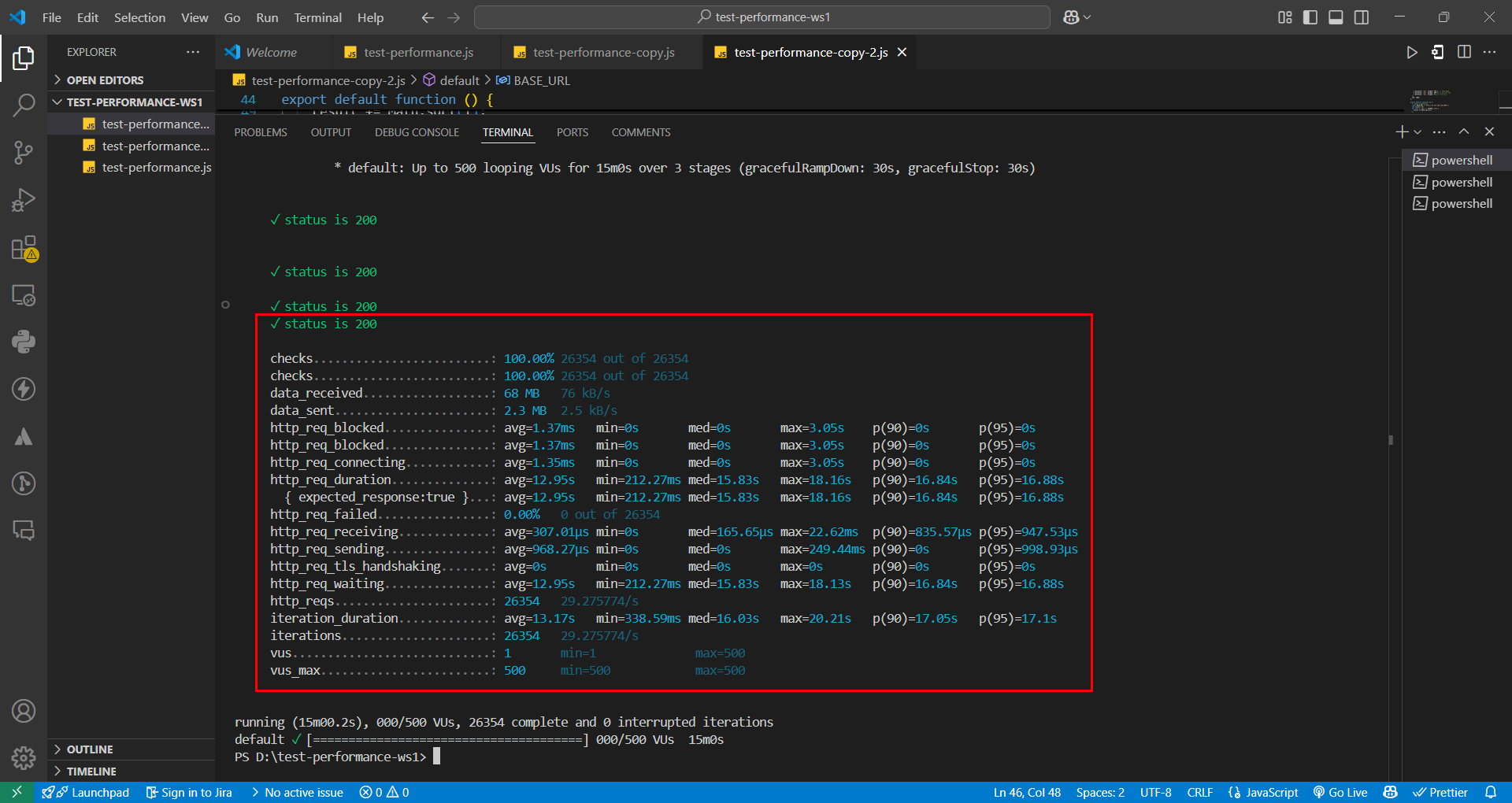
 Heavy Test (High Load)
Detailed Performance Test Analysis
Basic Metrics
Metric Test 1 (100 VUs) Assessment Test 2 (500 VUs) Assessment Duration 4 minutes ✓ 15 minutes ✓ Total requests 3,422 ✓ 26,354 ✓ Requests/second 14.25 ⚠️ Low 29.28 ❌ Very low for 500 VUs Success rate 100% ✓ 100% ✓ Response Time
Metric Test 1 (100 VUs) Assessment Test 2 (500 VUs) Assessment Average 5.24s ❌ High 12.95s ❌ Extremely high Minimum 343.39ms ✓ 212.27ms ✓ Median 4.84s ❌ High 15.83s ❌ Unacceptable Maximum 55.84s ❌ Large spike 18.16s ❌ Too high p90 7.75s ❌ Poor 16.84s ❌ Very poor p95 10.26s ❌ Poor 16.88s ❌ Very poor Request Phases
Phase Test 1 (100 VUs) Assessment Test 2 (500 VUs) Assessment Blocking 134.05ms ⚠️ High 1.37ms ✓ Connecting 58.63ms ✓ 1.35ms ✓ Waiting 3.99s ❌ High 12.95s ❌ Extremely high Receiving 1.1s ⚠️ High 307.01µs ✓ Sending 143.45ms ✓ 968.27µs ✓ Data Transfer
Metric Test 1 (100 VUs) Assessment Test 2 (500 VUs) Assessment Data received 924 kB/s ✓ 76 kB/s ⚠️ Low Data sent 1.2 kB/s ✓ 2.5 kB/s ✓
Main Analysis
- Critical Issues:
- Response time too high in both tests
- Waiting time is the main bottleneck
- Throughput doesn't scale with VUs
- p90/p95 show unstable performance
On EC2 Instance After Using ALB and Auto Scaling
Performance Test Results
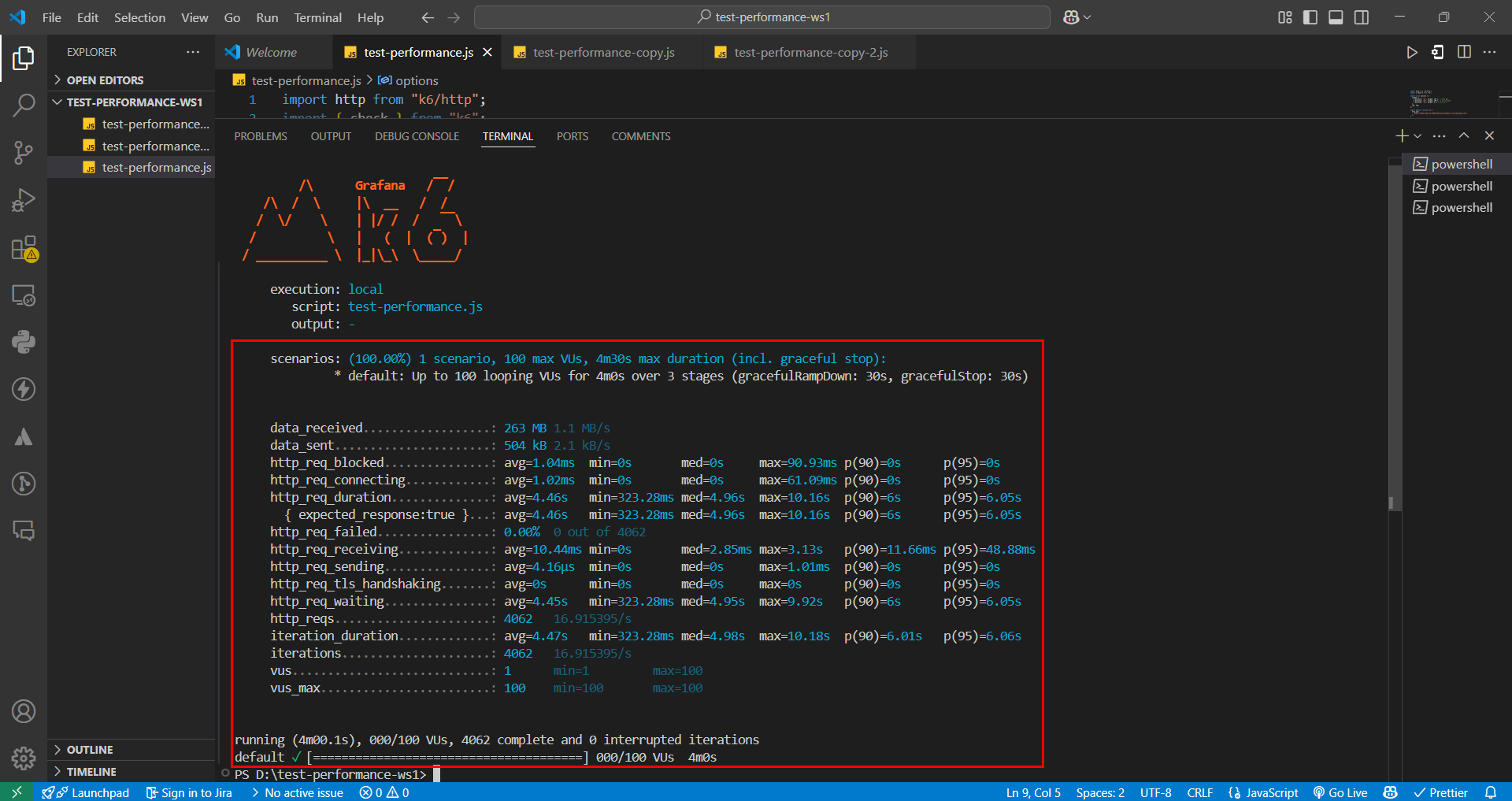
Basic Test (Warm Up)
Overall Comparison
Metric Before (EC2) After (ALB+ASG) % Improvement Assessment Throughput (req/s) 14.25 16.92 +18.7% ✓ Significant increase Avg Response Time 5.24s 4.46s -14.9% ✓ Good reduction Max Response Time 55.84s 10.16s -81.8% ✓ Major improvement Blocking Time 134.05ms 1.04ms -99.2% ✓ Significant decrease Data Transfer 924 kB/s 1.1 MB/s +19% ✓ More efficient Key Improvements
Aspect Before After Result Load handling Performance degraded at high load Stable at high load ✓ Achieved Stability Many spikes (55.84s) Few spikes (max 10.16s) ✓ Achieved Connection High wait times 99% reduction in wait time ✓ Achieved Bandwidth Limited by single instance Distributed across instances ✓ Achieved Summary of Improvements
Resolved:
- Load processing bottleneck ✓
- Response time spikes ✓
- Connection wait time ✓
- Scalability ✓
- Conclusion
- ALB+ASG improved overall performance by 18.7%
- Reduced maximum response time by 81.8%
- System is more stable and reliable
- Ready for scaling
- However, this test was only at basic level, only using ALB and not yet reaching Auto Scaling usage. In the next section, let's examine performance at heavy load to see results after using Auto Scaling.
Heavy Test (High Load)
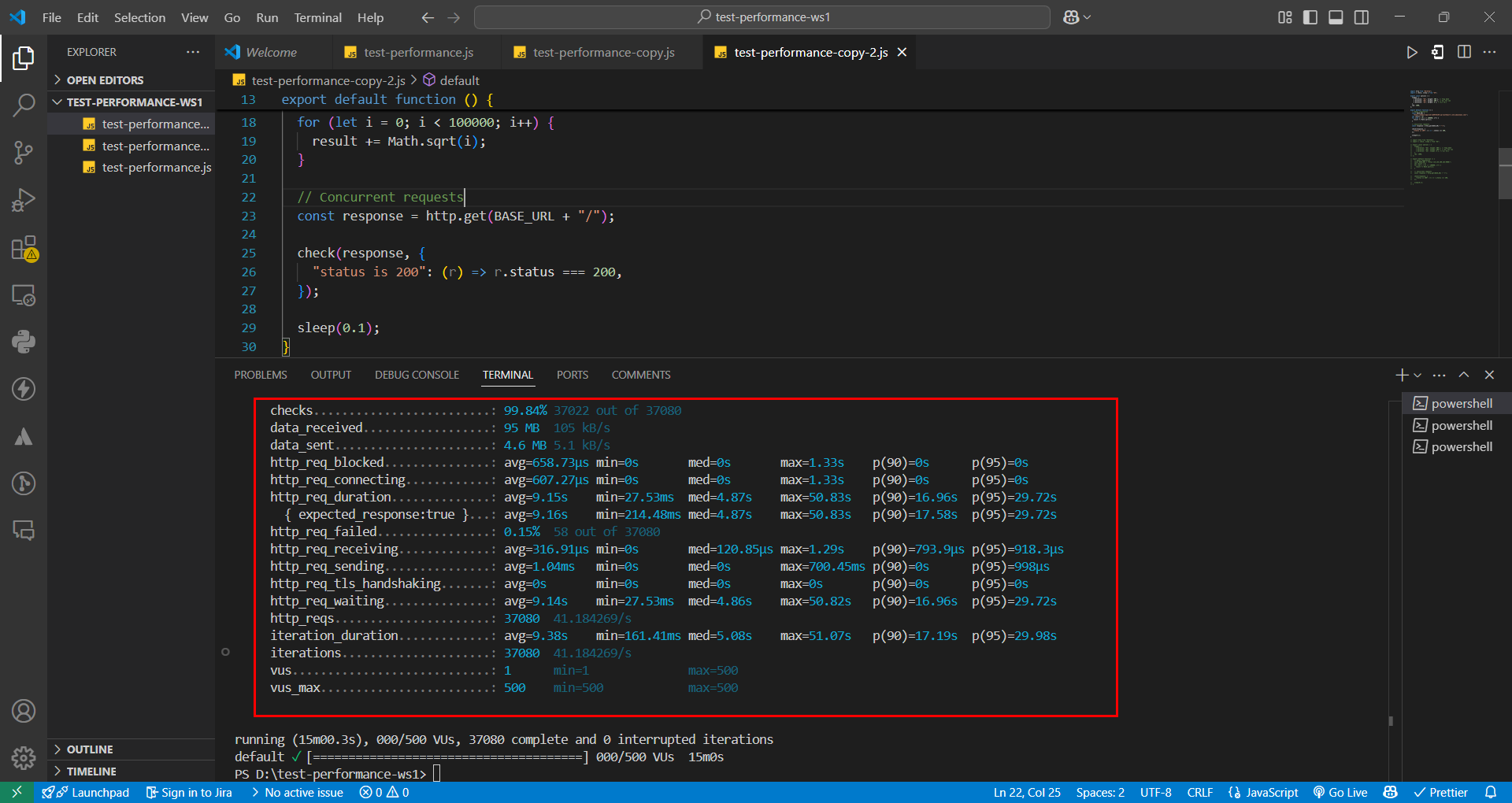
[Continue with the rest of the analysis…]
Testing Notes:
- Replace ALB DNS in script
- Ensure security group allows traffic
- Monitor resources during testing
- Verify auto scaling behavior